
Clean exits, from resignation to final settlement
Take the resignation, hold the exit interview, collect company assets and work out the full and final settlement, all on one record, so nothing is missed on someone's last day.
- ResignationFrom the app
- Asset collectionIn the clearance
- F&FWorked out
Real AiroHR screens, shown with a demo company and made-up data
- 5statutory deductions in every run: PF, ESI, PT, LWF and TDS
- 22states and union territories with Professional Tax slabs built in
- 6languages in the employee app, on Android and iPhone
- ₹59per employee a month: where plans start (GST extra)
Built for Indian statutory compliance
- PFProvident FundEPF, EPS and EDLI
- ESIEmployees' State InsuranceBoth shares
- PTProfessional TaxState slabs
- LWFLabour Welfare FundBy state
- TDSTDS on salaryThe monthly amount you set
- LCLabour CodesThe 50% wage rule
Every step of leaving, in order
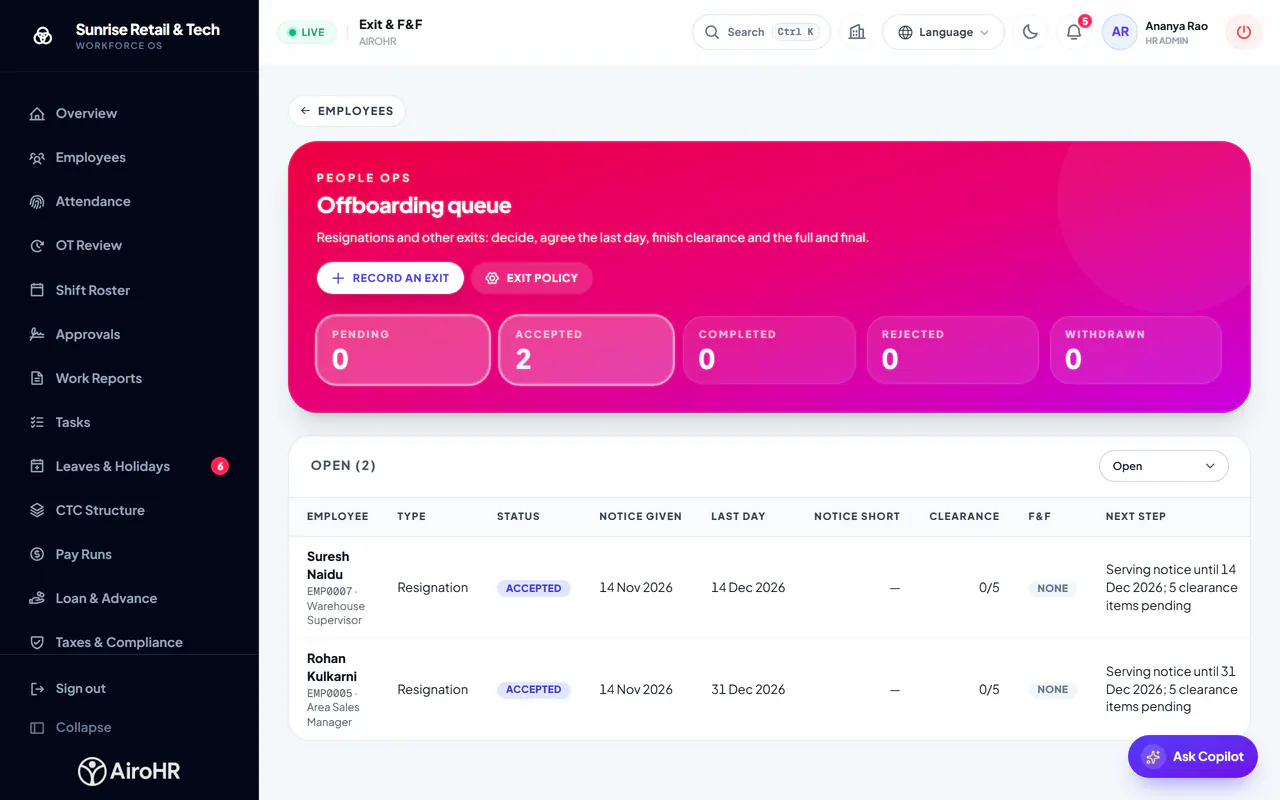
One screen for each person leaving, from the day they resign until the settlement is paid.
Resignations
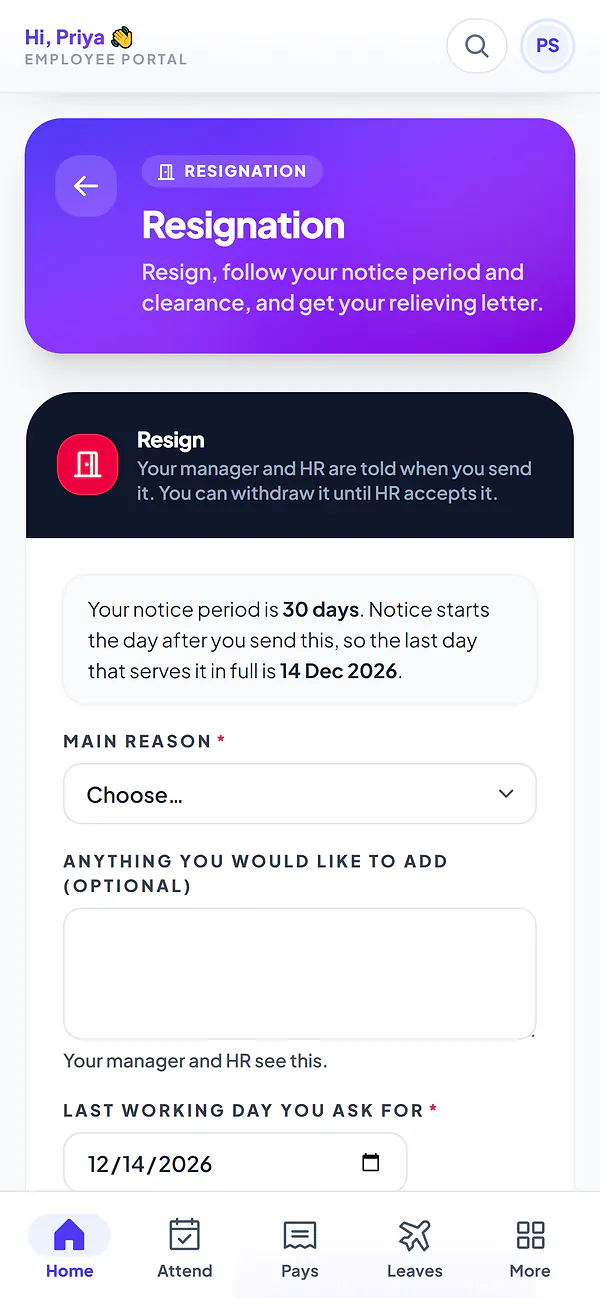
Employees resign from the portal with their last working day, notice period and reason, and can withdraw it. HR accepts or rejects with remarks.
One exit queue
See everyone who is leaving and how far along they are, then open a person to work through their exit.
Exit interview
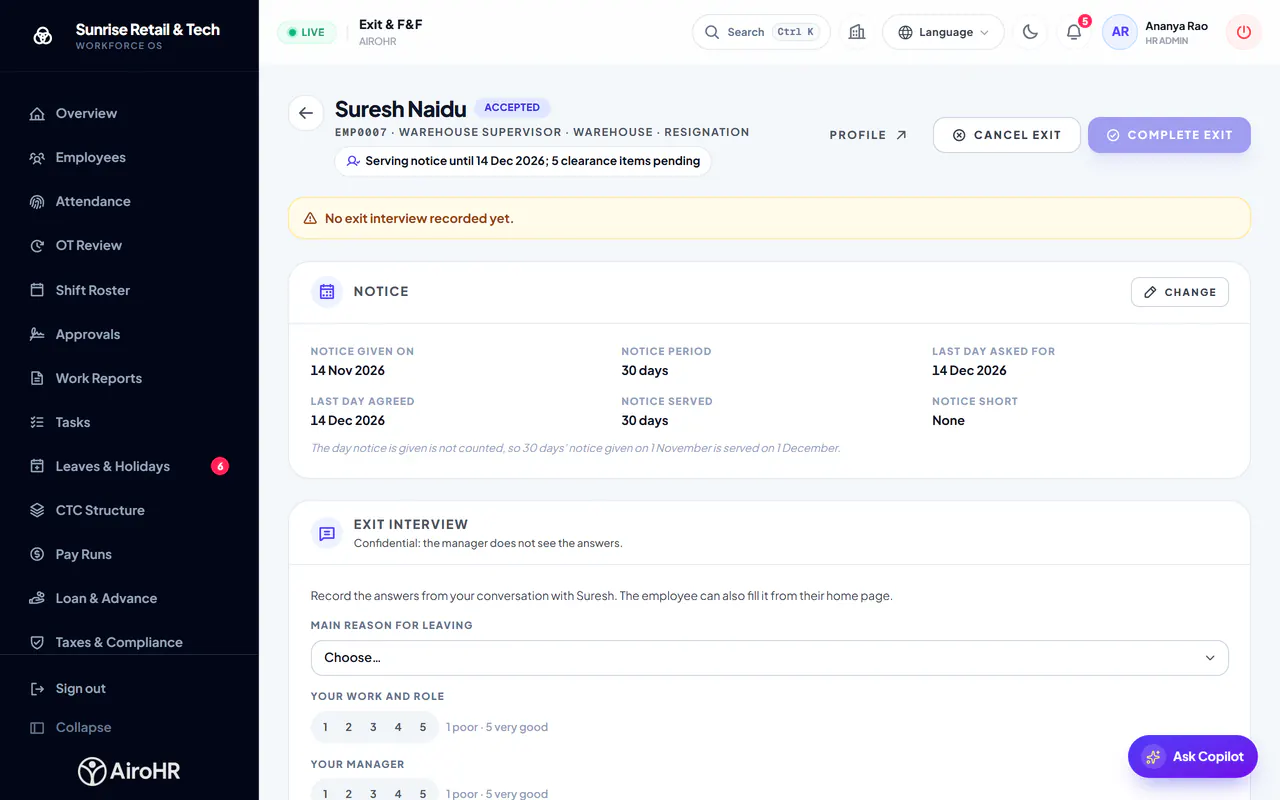
Record the conversation against seven set questions, so reasons for leaving are captured the same way each time.
Assets to collect
See what the person holds, mark each item returned, lost or damaged, and keep the settlement from being paid while items are out, unless HR records why.
F&F calculation
AiroHR works out unpaid salary, leave encashment, gratuity, notice recovery and loans and advances still owed. HR can change any line and add bonus, claims, tax and other recoveries.
Employee confirmation
Send a settlement statement by link. After a one-time code, the employee accepts it by typing their name or sends a query to HR.
Each exit, step by step
One exit in AiroHR: the notice given, the notice period and the last day agreed, the exit interview and the clearance items still open. A made-up employee of a demo company.
- Exit interview the manager does not see
- Asset collection in the clearance
- F&F calculation, then the employee confirms
Real AiroHR screens, shown with a demo company and made-up data
From notice to no dues
Resignation comes in
The employee submits it from the portal, and HR accepts or rejects it.
Exit interview and assets
Hold the interview and collect everything the person was given.
Settle
Review the calculated F&F, approve it and mark it paid.
Close it out
Get the employee's confirmation by link and issue their relieving and experience letters.
Fewer loose ends
- A settlement moves from draft to approved to paid, so nothing goes out on a first draft.
- Assets still out stop the settlement being marked paid. A waiver needs a written reason.
- Gratuity is worked out from service and basic pay, with the statutory cap applied.
- Reasons for leaving feed the attrition chart in Analytics.
What the settlement covers
- Worked out for you: unpaid salary, leave encashment, gratuity, notice recovery, and loans and advances still owed.
- Added by HR: pending bonus, claims, tax and other recoveries.
- Any line can be changed by HR before approval.
Exit & F&F questions, answered
Can an employee resign from the app?
Yes. They give their last working day, notice period and reason from the employee portal or app, and can withdraw it.
How is the full and final settlement worked out?
AiroHR calculates unpaid salary, leave encashment, gratuity, notice recovery and loans still owed from the employee's records. HR reviews each line, can change it, and adds anything else such as bonus or tax.
Are loans recovered automatically?
Yes. The settlement takes off the unpaid balance of approved loans, and any approved salary advance that a locked payroll has not yet recovered. The figure shows which loans it came from, and HR can change it.
Does the gratuity figure cover fixed-term staff?
Yes. Mark the person as a Fixed-Term Employee on their profile, and gratuity is worked out pro rata after one year of service, under the Labour Codes. For a contract shorter than a year, HR enters any amount due.
Can we pay the settlement if a laptop has not come back?
Yes, but HR must record a reason for the waiver, and that is kept on the record.
How does the employee confirm the settlement?
HR enters the final figures in an Exit Settlement link. The employee confirms a one-time code, reads the statement, then accepts it by typing their name or sends a query to HR.
This page describes AiroHR as of October 2026. Steps done by employees need the employee portal or app on their plan.
Make your next exit a clean one
Book a demo and we will walk through an exit from resignation to settlement.
Book a demo