
Hire from one place, from job post to first day
Open a job, publish it on your own careers page, and take applications with resumes that are read for you. Move each candidate through a simple pipeline, then turn the person you hire into an employee record in one step.
- Your own careers pageOn airohr.com
- ResumesPDF and Word, read for you
- Hire to employeeOne step
Real AiroHR screens, shown with a demo company and made-up data
- 5statutory deductions in every run: PF, ESI, PT, LWF and TDS
- 22states and union territories with Professional Tax slabs built in
- 6languages in the employee app, on Android and iPhone
- ₹59per employee a month: where plans start (GST extra)
Built for Indian statutory compliance
- PFProvident FundEPF, EPS and EDLI
- ESIEmployees' State InsuranceBoth shares
- PTProfessional TaxState slabs
- LWFLabour Welfare FundBy state
- TDSTDS on salaryThe monthly amount you set
- LCLabour CodesThe 50% wage rule
Everything between "we are hiring" and "welcome aboard"
Recruitment sits inside AiroHR, so the person you hire joins the same records that attendance and payroll use.
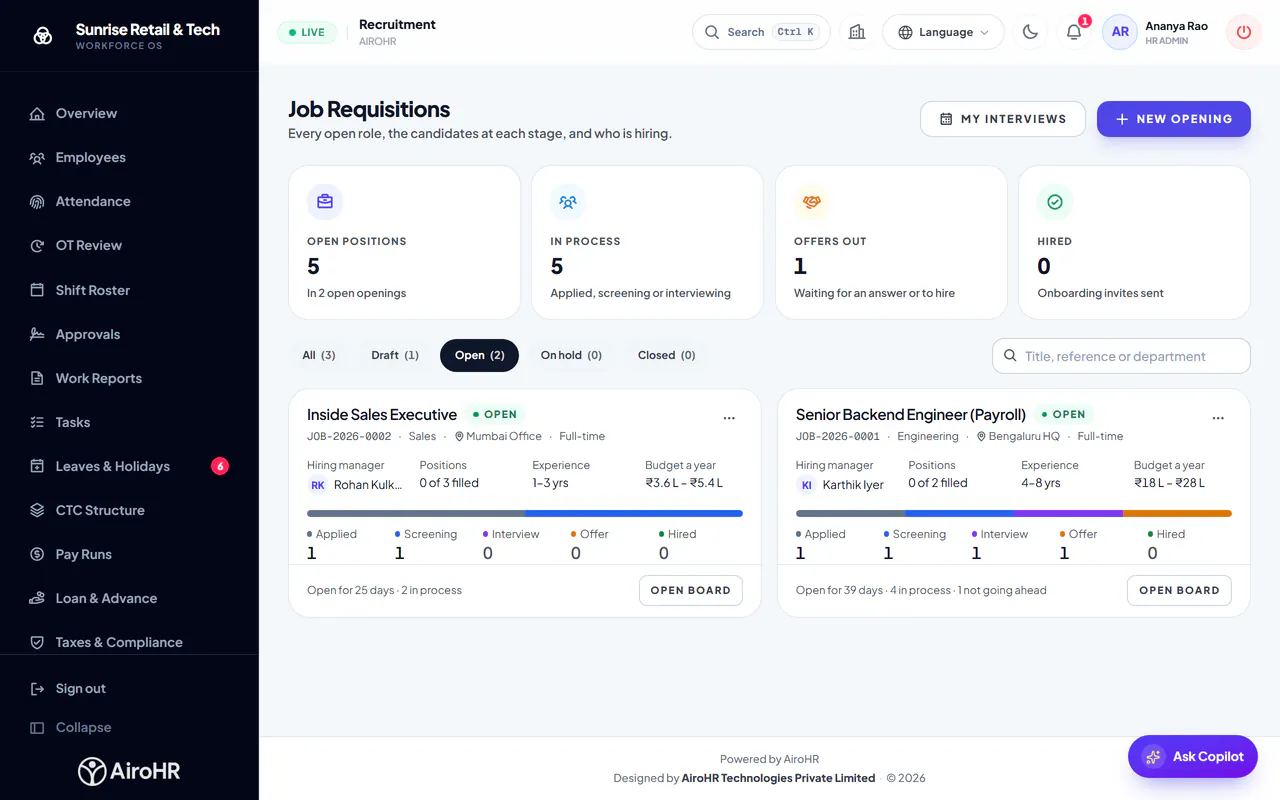
Job requisitions
Record each opening with its department, location, job type, number of openings, experience and salary range. Move it from draft to open, on hold or closed.
Your own careers page
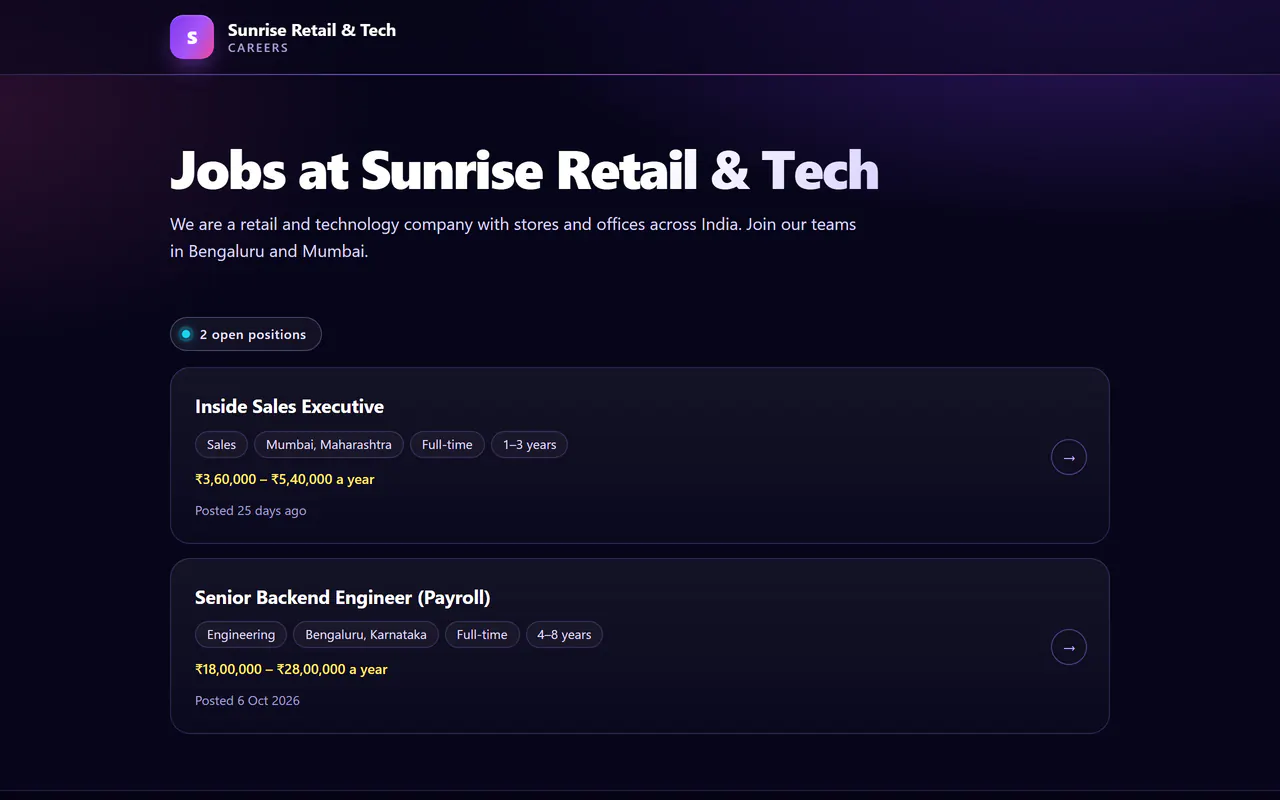
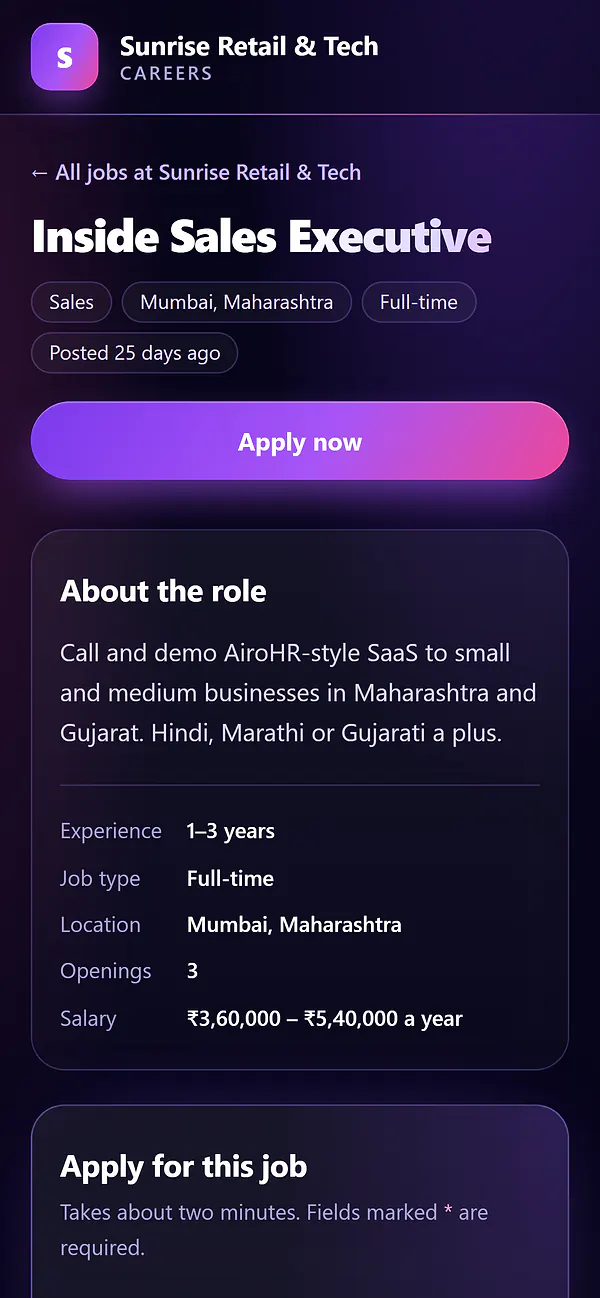
Publish every open job on a page of your own at airohr.com/careers, with your name and logo and an apply form that works on a phone. Candidates do not need an account.
Resumes read automatically
PDF and Word resumes are read the moment they arrive. Name, email, phone, experience, skills, education and languages appear on the candidate's page.
Hiring pipeline
Every candidate sits in one stage: applied, screened, interviewed, offered or hired, with rejected and withdrawn kept apart. Each move is recorded with who made it and when.
Interviews and scorecards
Schedule each round with a time and a meeting link or location, and download a calendar file. Record each interviewer's rating, strengths, concerns and recommendation.
Offer letters
Generate an offer letter PDF with the role, joining date and CTC, and record the signature against the candidate.
Hire in one step
Turn the accepted candidate into an employee record with their name, email, role, department and joining date. The job closes by itself when every opening is filled.
Found on job search
Every job page carries the details Google job search reads. Job feeds in the Indeed and LinkedIn formats are ready if you sponsor jobs on Indeed or buy LinkedIn job slots.
Know where hires come from
Mark each candidate's source, such as your careers page, Naukri, LinkedIn, Indeed or a referral. Candidates you meet elsewhere can be added by hand with their resume.
Your own careers page, ready on a phone
Every open job on a page of your own at airohr.com/careers, with an apply form that works on a phone. This one is the demo company's.
- Candidates apply without an account
- PDF and Word resumes read
- Job feeds for Indeed and LinkedIn
Real AiroHR screens, shown with a demo company and made-up data
From opening to joining
Open the job
Add the requisition and click Open for Applications. It appears on your careers page straight away.
Share the link
Copy each job's link or share it on WhatsApp. Candidates apply with their resume in about two minutes.
Review and interview
See what the resume says beside the application, move good candidates forward, and record each interview on a scorecard.
Offer and hire
Generate the offer letter, record the signature, and convert the candidate to an employee on the day you are ready.
Details that matter when you hire here
- CTC is asked in lakhs a year, the way candidates quote it, and stored in rupees.
- Notice period is on the form, so you know who can join quickly.
- Mobile numbers in any common format are tidied to +91 XXXXX XXXXX.
- The resume reader knows Indian degrees and exams such as B.Com, BBA, PUC and SSLC, and skills such as Tally, GST, PF and ESI.
- Candidates tick a consent box before they share their details.
Applications stay protected
- Resumes are private files, opened only by signed-in HR users with permission.
- Hidden checks and limits on each connection keep spam out of the apply form.
- One application per email address for each job.
- Your admins get a bell notification for every new application.
Recruitment questions, answered
Do candidates need to create an account?
No. They open the job, fill in the form, attach a resume and send it. There is nothing to sign up for.
Which resume files can AiroHR read?
PDF, Word .docx and old Word .doc files up to 5 MB. Scanned image PDFs have no text to read, so those are kept for you to open and the candidate page says the resume could not be read.
Can we post jobs on Naukri, Indeed and LinkedIn from AiroHR?
Your open jobs carry the details Google job search reads. For Indeed and LinkedIn, AiroHR gives you job feeds, which are used if you sponsor jobs on Indeed or buy LinkedIn job slots. Naukri does not read feeds: post the job there and point candidates to your job link, or add them by hand.
Does AiroHR email candidates?
The careers page confirms each application on screen. Interview invitations and offers are sent by your team, so you stay in control of what each candidate hears.
Can candidates sign the offer letter online?
Not yet. HR generates the offer letter as a PDF, shares it with the candidate, and records the signature in AiroHR with the name and date.
Does the new hire need to be typed in again?
No. Hiring a candidate creates their employee record with name, email, role, department and joining date. HR then adds the salary structure and statutory details in the usual way.
This page describes AiroHR as of October 2026.
See the hiring flow for yourself
Book a demo and we will walk through a job from opening to joining.
Book a demo